

N8EI put out a nice post on how to upgrade your ASL3 from Bookworm to Trixie, and you can get the new WebUI, which is automatically installed if running their image, or manually install if you added ASL3 to Raspberry Pi OS yourself.
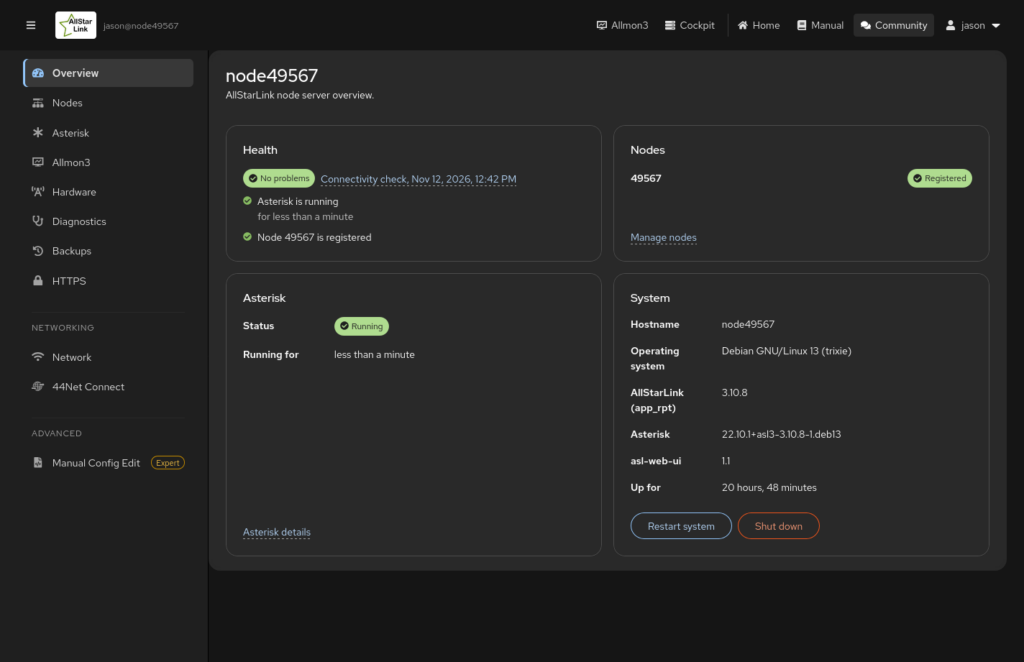
Note, my ASL3 box has a Raspberry Pi 3A with only 512MB of ram, so mine crashed and rebooted towards the end of the upgrade portion, so I tried to run the command again after logging back in and it gave me the dpkg command to run below, which seemed to have picked up and finished just fine saving me from having to use the image and transfer over the configuration.
dpkg --configure -aAlso, if you have the old Skywarn Plus installed on your node, there is one more step I got from the bottom post.
pip3 install --break-system-packages audioop-lts pydubSomeone was working on an updated version of Skywarn Plus as the original programmer archived the project with no further development, so eventually we may need to change over. Hopefully the Allstarlink guys will add it to the repository as a package and make installation easier, as they’ve been doing great work with Allstarlink v3, and this is a valuable package for people where there is severe weather, which is much of the country.
https://community.allstarlink.org/t/asl-ui-on-bookworm/25171/2
N8EI ASL Community Admin
No, it does not. WebUI is not going to be backported to Debian 12 Bookworm. However you can do an in-place upgrade to Trixie. The basic steps are:
- Login to your node via SSH or through the Cockpit terminal.
- Become root with
sudo -s - Run a backup of your node through the current
asl-menuCLI tool - Run the following commands ONE AT A TIME DO NOT COPY AND PASTE ALL OF THEM:
apt update apt upgrade -yperl -pi -e 's/bookworm/trixie/g' /etc/apt/sources.list /etc/apt/sources.list.d/*apt update apt upgrade -y apt dist-upgrade -y- At some point, you may be asked to accept a Debian version change. Always answer
Y
- Reboot your node
- Login to your node via SSH or through the Cockpit terminal.
- Run the following commands ONE AT A TIME DO NOT COPY AND PASTE ALL OF THEM:
apt remove dahdi-dkms -yapt autoremove -yapt purge $(dpkg -l | grep -E '^rc' | awk '{print $2}')
- You should now be running on Debian Trixie.
# cat /etc/debian_version 13.7
- If you aren’t running ASL3 Appliance, install asl-web-ui:
apt install -y asl-web-ui
- If you aren’t running the appliance, you’ll need to add your local user to the group. Assuming it’s KC1NE then run
usermod -aG asl-web-ui KC1NE.
It’ll take a bit on a Pi using an SD card (Assuming that’s what you’re running).
From: Jory A. Pratt <geekypenguin@gmail.com>
Subject: [PATCH] Add Debian Trixie compatibility for pydub installation

This patch adds automatic detection and handling for pydub installation
on Debian Trixie systems where python3-pydub is not available due to
Python 3.13 removing the audioop module.

Changes:
- Removed direct python3-pydub installation via apt
- Added logic to detect if python3-pydub is available in system packages
- Falls back to installing audioop-lts and pydub via pip when system
  package is unavailable (required for Python 3.13 compatibility)

This ensures SkywarnPlus works correctly on both Debian Bookworm (where
python3-pydub is available) and Debian Trixie (where it must be
installed via pip).

---
diff --git a/swp-install b/swp-install
index acd6234..9e64c4b 100644
--- a/swp-install
+++ b/swp-install
@@ -111,7 +111,18 @@ install_dependencies() {
             apt install -y unzip python3 python3-pip ffmpeg
             pip3 install ruamel.yaml requests python-dateutil pydub
         else
-            apt install -y unzip python3 python3-pip ffmpeg python3-ruamel.yaml python3-requests python3-dateutil python3-pydub
+            # Check Debian version to determine if we need to install pydub via pip
+            # python3-pydub is not available in Debian 13 (Trixie) due to Python 3.13 compatibility
+            apt install -y unzip python3 python3-pip ffmpeg python3-ruamel.yaml python3-requests python3-dateutil
+
+            # Try to install python3-pydub, if it fails (not available in Trixie), use pip instead
+            if apt install -y python3-pydub 2>/dev/null; then
+                echo "Installed python3-pydub from system packages"
+            else
+                echo "python3-pydub not available in system packages (likely Debian Trixie)"
+                echo "Installing audioop-lts and pydub via pip (required for Python 3.13 compatibility)"
+                pip3 install --break-system-packages audioop-lts pydub
+            fi
         fi
     elif [ "$OS" = "arch" ]; then
         pacman -Syu --noconfirm