

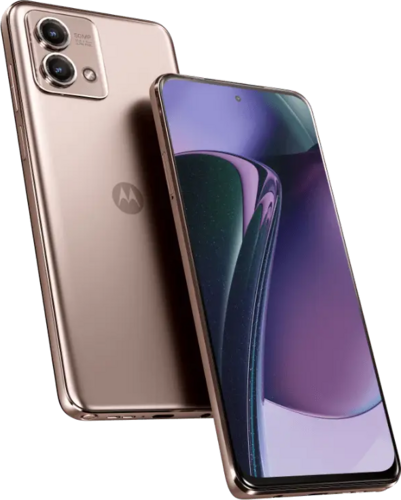
(Headline link at bottom) Checking back in on LineageOS supported devices, I noticed they added my old Motorola Stylus 5G 2023 phone to the supported list. Currently I’m using a Motorola G 5G 2024 I put LineageOS on, but though having a couple years of battery wear the Motorola Stylus 5G 2023 is a higher end phone with better screen and processor. So having messed up and left the Google account active on it triggering an Android security feature, I needed to install the stock ROM on the device before installing LineageOS again (stock ROMs for Motorola can be found on lolinet). and this article below was a great help. You still have to manually write the script and pay close attention to the instructions, but I was able to get it installed and make sure there was no Google account before upgrading to LineageOS.
#!/bin/bash
fastboot getvar max-sparse-size
fastboot oem fb_mode_set
fastboot flash partition gpt.bin
fastboot flash bootloader bootloader.img
fastboot flash vbmeta vbmeta.img
fastboot flash vbmeta_system vbmeta_system.img
fastboot flash modem_a NON-HLOS.bin
fastboot flash modem_b NON-HLOS.bin
fastboot flash fsg_a fsg.mbn
fastboot flash fsg_b fsg.mbn
fastboot erase modemst1
fastboot erase modemst2
fastboot flash bluetooth_a BTFM.bin
fastboot flash bluetooth_b BTFM.bin
fastboot flash dsp_a dspso.bin
fastboot flash dsp_b dspso.bin
fastboot flash logo logo.bin
fastboot flash boot boot.img
fastboot flash vendor_boot vendor_boot.img
fastboot flash dtbo_a dtbo.img
fastboot flash dtbo_b dtbo.img
fastboot flash recovery_a recovery.img
fastboot flash recovery_b recovery.img
fastboot flash super super.img_sparsechunk.0
fastboot flash super super.img_sparsechunk.1
fastboot flash super super.img_sparsechunk.2
fastboot flash super super.img_sparsechunk.3
fastboot flash super super.img_sparsechunk.4
fastboot flash super super.img_sparsechunk.5
fastboot flash super super.img_sparsechunk.6
fastboot flash super super.img_sparsechunk.7
fastboot flash super super.img_sparsechunk.8
fastboot flash super super.img_sparsechunk.9
fastboot flash super super.img_sparsechunk.10
fastboot flash super super.img_sparsechunk.11
fastboot flash super super.img_sparsechunk.12
fastboot flash super super.img_sparsechunk.13
fastboot flash super super.img_sparsechunk.14
fastboot flash super super.img_sparsechunk.15
fastboot flash super super.img_sparsechunk.16
fastboot flash super super.img_sparsechunk.17
fastboot erase apdp
fastboot erase apdpb
fastboot erase carrier
fastboot erase userdata
fastboot erase metadata
fastboot erase ddr
fastboot oem fb_mode_clear
After running the above script I was able to setup the device without a Google account and then install LineageOS and get the phone working properly. I used the LineageOS Seedvault backup from my primary device saved to a USB thumb drive to restore on the Motorola Stylus 5G, and it mostly worked. I still need to manually setup some apps for install sources (F-Droid, Obtainium and Accrescent) and put in my crypto wallet seeds as the app data didn’t carry over for those. But it did cut down on most of the initial setup. At least I have a solid backup phone with LineageOS limiting Google tracking, which would also be good for an international trip and wiping the device before border checks where they might want you to unlock the device to peruse it violating my fourth amendment rights… And with LineageOS you have updates every week even though Google is limiting Android source code releases and you still need to depend on Motorola for their device firmware releases… But opensource Android security and bugfixes from the community still will reach your phone weekly as incorporated by LineageOS. Hopefully the Nura Linux phone operating system (formerly postmarketOS) will advance in case Google further restricts Android source code releases going forward. Or perhaps, there will be significant Android opensource development maybe forking it from Google as there are enough privacy focused Android OS versions who could pool their development resources.
https://droidwin.com/how-to-flash-motorola-firmware-via-flashfile-xml-or-servicefile-xml/