

This reminds me of the old Sony Rootkit that was installed from a music CD, showing just how little respect these megacorps have for you. My LG monitor is quite old, but Arch pacman doesn’t install things without me seeing and approving them… And yet another reason to ditch Microsoft products, though the GDID and tracking everything you do should have been enough already.
https://hackread.com/lg-monitors-install-adware-app-windows-pcs/
Connecting certain LG monitors prompts Windows Update to install an LG app without consent, while the software runs at startup and displays McAfee trial adverts.
By Waqas
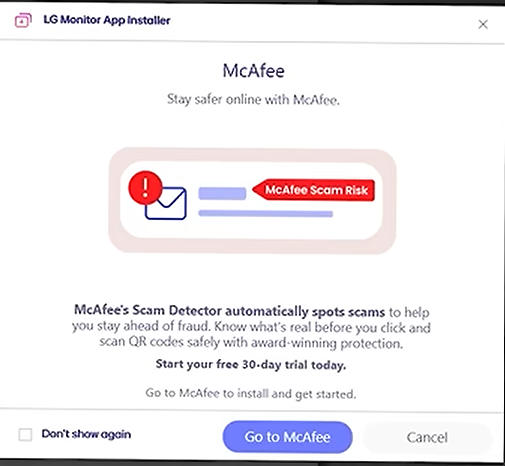
LG is facing criticism after users found that connecting certain LG monitors to Windows PCs can automatically install an application that promotes paid McAfee antivirus subscriptions. The LG Monitor App Installer arrives through Windows Update without an approval prompt, and the first visible interaction may be an advertisement.
Windows begins the download after identifying the connected display and retrieving LG extension and software component packages. The process then installs the application from the Microsoft Store, where its listed capabilities include internet access and the ability to use all system resources.
McAfee Ads Appear Without Prior Consent
Popular YouTube channel Gamers Nexus reproduced the process using an LG UltraGear 34GX900A-B. Windows Reliability Monitor showed the LG Monitor App Installer arriving about one minute after Windows Update installed the associated LG packages, with no installation request or consent screen.
During 32 consecutive system boots, the application displayed a McAfee promotion 31 times. The remaining boot promoted one of LG’s monitor utilities. According to VideoCardz, the McAfee offer provides a 30-day trial that later converts into a paid subscription.
Once installed, the application registers itself to run when Windows starts. This allows its promotional messages to return after subsequent reboots, even though the owner never requested the software.
LG App Runs Outside the Windows App Sandbox
The Microsoft Store listing says LG Monitor App Installer can access the internet and use “all system resources.” Microsoft describes this capability as runFullTrust, which allows a desktop application to operate outside the restricted Windows AppContainer.
It is worth noting that this permission does not automatically give the app administrator or SYSTEM privileges, and there is no evidence that it steals files or other private information.
However, a full-trust desktop application has more freedom than a sandboxed Store app, making installation without clear approval a valid cybersecurity and privacy concern.
LG describes the installer as a tool for obtaining compatible monitor applications, including OnScreen Control, LG Switch and Dual Controller. The Store listing also contains McAfee trial language, confirming that antivirus promotion forms part of the application.
Older LG Monitors Are Also Affected
Owners cannot assume the behavior is limited to recently released hardware. Gamers Nexus received the same popup from an LG UltraFine 32UN880-B purchased three years earlier and already used in its office.
https://www.youtube.com/embed/Q9uefFYe6bM?feature=oembed Watch as Gamers Nexus explains the issue
Reports of LG Monitor App Installer appearing without approval date back to at least 2024. More users have reported McAfee advertisements during recent weeks, which may indicate that LG has enabled the installer for additional models or changed how frequently the promotions appear. Android Authority described the application as effectively functioning like adware.
Windows Allows Device-Associated Apps to Install Automatically
Microsoft also has a role because Windows permits manufacturers to associate Store applications with device metadata. The feature can deliver drivers and useful companion utilities when compatible hardware is detected, but it can also install promotional software without presenting the owner with a clear choice.
Allowing a hardware vendor to initiate a full-trust application that immediately promotes a paid product exposes a weakness in this approval model. Windows treats the vendor association as sufficient authorization, even when the owner connected the monitor only to use it as a display.
How to Remove This App
Users can remove LG Monitor App Installer through Windows Settings and disable remaining LG entries under Startup Apps. Windows Pro and Enterprise users can also enable “Prevent automatic download of applications associated with device metadata” under Computer Configuration, Administrative Templates, System and Device Installation. Enabling this policy may also block useful companion applications for other hardware.
LG had not publicly explained the behavior at the time of publication. Microsoft had also not announced any change requiring explicit approval before device-associated Store applications are installed.