

After looking around the SonicDE website and checking the discussions on Github, I took the plunge and installed the repo and switched over from KDE. Note that KDE just came out with 6.7 which is the last version to support X11, and installing SonicDE will drop you to 6.6 until they catch up. But SonicDE 6.6 is working fine on both of my computers. It looks like switching back to KDE might be a pain because it wants to replace XLibre with Xorg. The SonicDE project is just starting, and we should see more community support as we grow closer to KDE 6.8 abandoning X11. KDE was a screeching woke organization which will probably grow worse with Germany’s financial support, so it’s great we’ll have a forked version for those who liked the desktop environment, don’t want to be forced to use Wayland, and don’t want the sexual deviant agenda being pushed by a software project. The SonicDE main page has how to install on other distributions, and with Linux you can have multiple DE’s installed to switch between, so a good idea to have a backup or two, e.g. XFCE, Cinnamon…
https://sonicde-arch.github.io
SonicDE Packages for Arch Linux Systems
This third-party repository provides SonicDE x86_64 binary packages for Arch Linux-based distributions. SonicDE, or the Sonic Desktop Environment, aims to preserve and improve the X11-specific aspects of KDE. You can learn more about SonicDE at sonicde.org.
The packages of this repository are known to work with Arch Linux and Garuda Linux. We’ll also verify the functionality on ArchCraft, CachyOS, EndeavourOS, the testing branch of Manjaro Linux, and RebornOS.
Installing SonicDE Manually
Adding the Public Package Signing Key to pacman
First, please download the public OpenPGP signing key sonicde-archlinux.asc used to sign the packages and add it to the pacman keyring:
curl -O https://sonicde-arch.github.io/sonicde-archlinux.asc
sudo pacman-key --add sonicde-archlinux.asc
sudo pacman-key --finger 3B87898C73F11DF5
sudo pacman-key --lsign-key 3B87898C73F11DF5
You can read more package signing on the pacman/Package signing – ArchWiki page.
Adding the Repository to Pacman
Once you added the public key, also add an entry for the SonicDE repository to the end of the file /etc/pacman.conf using sudo and your favorite editor:
[sonicde]
Server = https://sonicde-arch.github.io/$arch
Run pacman to update all package indexes and installed packages:
sudo pacman -Syyu
Installing SonicDE
Installing SonicDE is as easy as installing the sonicde-meta package:
sudo pacman -S sonicde-meta
The included packages will replace any of their installed KDE counterparts. When asked, just answer with y . To make use of SonicDE, log out of your desktop session and log in again.
In case you get kicked out of a running KDE session while you’re installing SonicDE, just re-run pacman after you logged in again and let it install the missing packages:
sudo pacman -S sonicde-meta
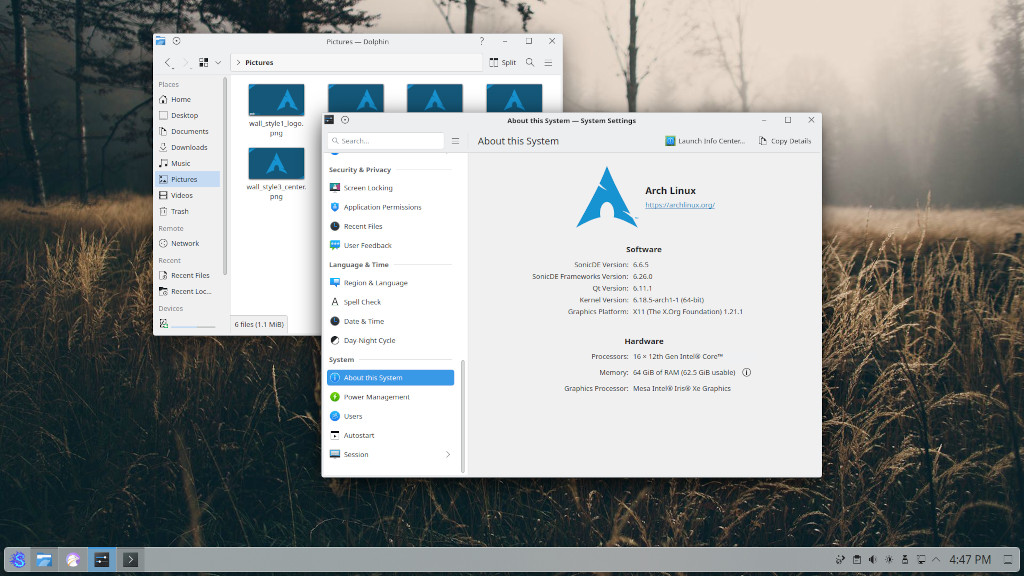
When done, start the program System Settings and verify that you’re running SonicDE on the “About this System” page. You do? Congratulations!
Getting in Contact
Please report any enhancement requests or issues with this repository at Issues · sonicde-arch/sonicde-arch. If you have a specific issue, please see the list of package repositories and report it there. In case you need help, want to report success or talk about other aspects, please also check the official SonicDE channels.