

Apple users beware, it’s a bit tougher to turn off the different radios, and you can’t do it at all if using the theft location feature. I always turn off WiFi when leaving the house and have my LineageOS phone in airplane mode when in my pocket and out of the car, enabling the cellular and Bluetooth for connecting to the car stereo for music, though most of my music is downloaded to the phone so I could forgo the cellular connection. Supposedly Cheyenne has at least one Leonardo device, and uncertain if they have updated to the new firmware, but the city council welcoming all the data centers is intent on tracking all of us through the city with Flock ALPR cameras and whatever else they can muster. A good reminder to vote down all the taxes you can so your locality won’t have the funds for unnecessary surveillance contracts.
https://reclaimthenet.org/the-signals-that-follow-you-from-street-to-street
The roadside is becoming a listening post, and your devices keep volunteering clues.

By Ken Macon
On a seemingly ordinary road outside of Washington, DC, there are poles carrying gear that, according to its maker, logs the radio signals coming off phones, earbuds, and watches in passing cars, and ties this information to the car’s license plate.
In a post titled, “Thinking Critically About SignalTrace” – that was first published on August 2, 2026, and updated on September 18 – Ryan O’Horo, who writes a blog on security, said he found four installations in Oxon Hill, Maryland, near National Harbor, on Oxon Hill Road and National Harbor Blvd, and that they are operated by the Prince George’s County Police Department.
O’Horo also found that “a few hundred feet north, a Flock Safety ALPR camera is installed.” (Flock Safety is a company that makes automatic license plate readers, or ALPRs.)
O’Horo found two more installations, in Solomons and Dunkirk in Calvert County, Maryland, which are served by the Calvert County Sheriff’s Department. He also published what he said was an invoice from June 2023 showing the sheriff’s office bought two SignalTrace devices.
O’Horo noted that the antennas are located in a way that allows them to pick up signals from devices carried by pedestrians, not just those in vehicles.
However, Reclaim The Net has not been able to confirm that the devices are actually in use, and that they are SignalTrace models.
What the devices do is not something that those driving past them would know.
The product page of SignalTrace, a surveillance tool made by Italy’s Leonardo and sold to police in the US, has undergone changes in recent months – but the most important thing about it, its purpose, has remained the same.
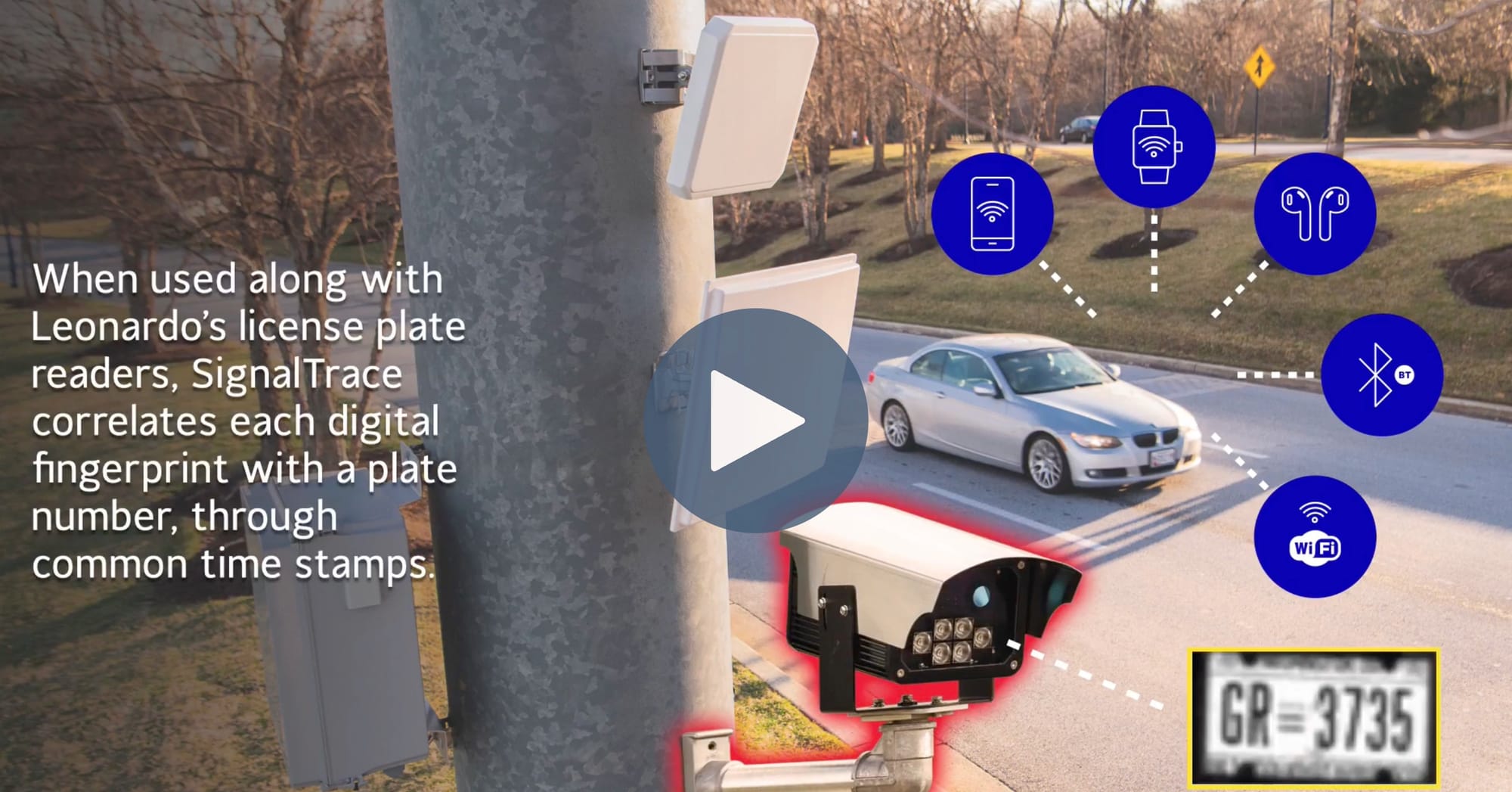
The product page, as it stood in June 2026, was very clear and direct: “Identify Suspects by the Electronic Devices They Use.”
At the same time, it was also clear that the product was not about the car itself, but the people in it – the pitch was about finding out who they are, by identifying their devices.
In June, the page said the product was “designed to help law enforcement identify people of interest by the signals emitted from their electronic devices they travel with, such as fitness trackers, smartwatches, RFID tags, and local signals from their mobile phones.”
When the reports first appeared in June, no police department had been confirmed to have bought the product, but by late July, the “suspects” were gone from the product’s page, and “leads” were in. And while the page still explains that the system can pinpoint a device by the unique signals it emits, the example given has been tweaked to remove the license plate, that was present in the June version.
On August 4, 2026, Leonardo announced the new name. The company said: “SignalTrace does not identify individuals, access communications or retrieve information stored on personal devices.”
The New York City Police Department (NYPD) is preparing to spend three-quarters of a million dollars on a cell-site simulator – a fake cell tower that vacuums up phone data of everyone in its vicinity.
The contract with an Israeli company Cognyte is worth $750,500 and will last for three years, the New York Daily News is reporting.
The New York Civil Liberties Union (NYCLU) says this is “highly intrusive” and “dragnet surveillance,” and the new tech “goes even further by incorporating undisclosed AI capabilities that analyze people’s behaviors.”
The NYPD has a policy that is supposed to regulate the use of cell-site simulators, and it says that a warrant is required, and that the technology will not be used to intercept content of communications.
Another exception to the warrant rule is if there’s an emergency – but then the police must obtain the warrant within 48 hours. And there’s also the “missing or suicidal person” exception, when a search warrant is not required at all.
Your phone is a snitch, and it’s a chatty one at that. While you are not using it, it keeps asking out loud for the networks it has known – and, in a real street, that “loud” announcement can leak passwords, names, and information about your holiday home.
Phones, when not connected to a Wi-Fi network, keep looking for one to connect to, and they do this by sending out what’s known as a probe request.
The University of Hamburg’s Johanna Ansohn McDougall and her colleagues decided to see what exactly is happening in this process, and how much sensitive information is being leaked. They recorded the data sent out by phones in a busy street in a German city for an hour, three times.
The team found that 23.2 percent of the probe requests contained the names of the networks, known as SSIDs.
As the researchers note, “users (probably by accident) input a wealth of data into the SSID field and find passwords, e-mail addresses, names and holiday locations.”
What’s more, “an attacker could follow the owner of a talkative device to their home and try out the password in their home network.”
Earbuds, watches, fitness bands and cars all broadcast short Bluetooth announcements all the time, so that phones can find them. And phones, in turn, rotate their Bluetooth addresses so that a listener sees a string of strangers rather than one device.
In 2019, a team from Boston University (Johannes Becker, David Li, David Starobinski) wrote: “we show that many state-of-the-art devices which are implementing such anonymization measures are vulnerable to passive tracking that extends well beyond their address randomization cycles.”
The team tested Fitbit watches and found that “while the TxAdd flag indicates that the devices use random addresses, the addresses actually never change” – and that “the smartwatch advertises approximately once every 7 seconds using this format.”
O’Horo says that “Bluetooth devices particularly tend to reveal the model in the device name, so even when they use BLE’s address randomization feature, you could know you’ve captured information about Bose product, or an infotainment system installed in an Audi.”
Apple itself advises users: “You can change the name of your iPhone, which is used by iCloud, AirDrop, Bluetooth®, your Personal Hotspot, and your computer.”
If you name your iPhone Fred’s iPhone – that’s what it will be announcing to the world as its Bluetooth name, its hotspot name, and on AirDrop.
When you switch off Wi-Fi and Bluetooth on your phone, they don’t always stay switched off.
On Android, there’s a setting that most people never chose but is enabled by default and keeps scanning for networks and devices even after you think you turned the radios off.
On iPhone, the Control Center’s “quick” buttons for Wi-Fi and Bluetooth don’t actually switch them off, they just disconnect from the networks and devices they were connected to, but remain available for future connections, and the system will use them if it sees fit.
Then there’s the cellular network. Your phone has to identify itself to it, and that’s done by sending the subscriber number (IMSI) and device number (IMEI) to the network. The problem is that a fake cell tower will ask the same questions, and the phone will provide the same answers.
This is why, as Google’s Android security team has noted, it’s easy to “push” a phone down to 2G, where the “attackers abuse the well known lack of mutual authentication in 2G and force connections to be unencrypted.”
In other words, 2G is an open door that, if not closed, can be easily exploited. It’s not a question of whether your carrier still uses 2G in your area or not, because “users are still vulnerable to this type of fraud as long as mobile devices support 2G, regardless of the status of 2G in their local carrier,” the Android team warned.
O’Horo says that SignalTrace can likely only collect data from Wi-Fi, Bluetooth, and certain 915MHz RFID devices – but not from every device, and not every time, given that cars are moving and all.
Newer phones do randomize their MAC addresses, and their signals are brief and “hopped” across different channels, which means that a roadside sensor is only getting fragments of data. But randomization is not the solution to the problem of device tracking. In 2016, Mathy Vanhoef and colleagues published a paper that showed that this method “does not guarantee privacy.”
The end result is that it is the people using cheaper and older devices who are least protected from tracking, as O’Horo noted: “This also creates an economic inequity. More modern and expensive devices defend against tracking better, including devices in more expensive vehicles.”
Many of the iPhone “fixes” to make the device less trackable cost absolutely nothing.
For one thing, those “convenience” buttons in the iPhone’s Control Center don’t actually turn off the device’s radios. Settings does.
If you want to turn off Wi-Fi and Bluetooth, don’t do it from the Control Center – instead, go to Settings, then Wi-Fi, and turn it off there. The same goes for Bluetooth.
If you’re using iOS 18 or a later version, you can make the device rotate the Wi-Fi address it uses to connect to a network. To do this, go to Settings, Wi-Fi, tap the More Info button next to the network you’re connected to, then go to Private Wi-Fi Address, and turn it on. You can choose to have the address rotate every two weeks, or keep it fixed. Apple advises that a fixed address is used by default when joining a network that uses WPA2 or stronger security. The company also explains that if the device always uses the same address across all networks, observers can more easily identify it and track its activity and location.
If you have any hidden networks saved, delete them, because the phone has to call out the name of a hidden network to find it.
There are a few more things you can do in Settings to make your iPhone a little less trackable. One is to rename the device. You can do this by going to Settings, General, About, Name. Apple says the name is “used by iCloud, AirDrop, Bluetooth®, your Personal Hotspot, and your computer.” So renaming it to something not very descriptive of you or your device would be a good idea. This will also rename your hotspot.
You can never truly “turn off” an iPhone – but there are trade-offs.
Find My, which keeps an iPhone “discoverable” for up to 24 hours after it’s been turned off, is useful if the phone is stolen – but it also means the phone is never really off.
Apple has instructions on how to turn off Find My on a device before switching it off, and you can also do it by tapping on the note that appears on the power-off screen.
Then there’s Lockdown Mode, which is the only way to turn off 2G on an iPhone – but it’s a heavy tool that should not be used lightly.
Apple itself says that Lockdown Mode is “an optional, extreme protection that’s designed for the very few individuals who, because of who they are or what they do, might be personally targeted by some of the most sophisticated digital threats. Most people are never targeted by attacks of this nature.”
Those who might be “personally targeted by some of the most sophisticated digital threats” would be reasonable candidates for using Lockdown Mode – that means journalists, activists, and anyone with a reason to believe they are a target. Not someone who simply wants to reduce their general exposure to tracking.
For those who are, or might soon become a target, Lockdown Mode can be found here: Settings, Privacy & Security, Lockdown Mode.
As for AirDrop, it should be kept on Contacts Only, and never set to “everyone.” This can be done by opening the Control Center, touching and holding the top-left controls, tapping AirDrop, and choosing Contacts Only.
Ultimately, the choice is yours.
Your first job after setting up your new Android device is to undo a setting it switched on for you.
We’ll get to what that is in a moment, but first, some advice: go into Settings, Location, Location Services, and turn off both Wi-Fi scanning and Bluetooth scanning. On Android 11 and older, these are located directly under Settings, Location.
You do this because these two are switched on by default, as a Google note from 2018 reveals, and as confirmed by GrapheneOS, which is an Android distribution that ships with these settings off.
While you’re there, turn off Improve Location Accuracy. Google itself said that “When Location Accuracy is on, Google periodically collects information about sensors and wireless signals near you to contribute to crowdsourced wireless signal locations.”
Another thing to change is the device name that’s broadcast by Wi-Fi and Bluetooth. Go to Settings, About phone, Device name, and change it from whatever it is to whatever you want it to be. The name of the hotspot is changed in a different place: Settings, Network & internet, Hotspot & tethering, Wi-Fi hotspot, Hotspot name.
Next, make sure that the MAC address of your device is randomized. Android’s own documentation says that “By default, Android uses persistent randomization.” But persistent means it doesn’t actually change, ever. As the documentation also has it, “This MAC address remains the same until a factory reset.” It doesn’t even change if you forget a network and then re-add it.
If you want your MAC address to actually change each time you connect to a network, you have to go to the developer options and enable “Wi-Fi non-persistent MAC randomization.”
The latest Android version, Android 16, brings several security and privacy features, but also one that is not immediately obvious: the 2G switch has been flipped.
Instead of turning 2G off, as was the case in Android 12 to 15, now you turn 2G network protection on.
The new setting is in Settings, Network & internet, SIMs, 2G network protection.
Not all phones running Android 16 will have this setting, however. Samsung phones, for example, don’t have a separate 2G switch; on One UI 6.1.1 and later, it is part of Settings, Security and privacy, Auto Blocker, Maximum restrictions. Samsung also warns that turning it on may interfere with calls, messages, and mobile data in areas where only 2G service is available.
Android 16 has also added a new section, Mobile network security, which can show notifications when the phone connects to an unencrypted network or is asked for its IMSI or IMEI. But the latter requires modem support, which, according to a 2025 report by the German site teltarif, current Pixels lack.
Then there is the ability to find devices even when they are offline. This is the same trade-off that Apple’s Find My iPhone has been making for years, and Google is not shy to admit it.
“By default, your Android device stores encrypted recent locations with Google and participates in the Find Hub network,” Google’s documentation reads.
You can turn this off, but it is on by default.
To do so, go to Settings, Google, All services, Find Hub, Find your offline devices. Then, you can choose from Off, Without network, With network in busy places only, and With network everywhere.
For those willing to go the extra mile, there is GrapheneOS, a privacy and security-focused mobile operating system that is a hardened version of Android, and can run on Pixel phones.
GrapheneOS gives a new random Wi-Fi address on every connection: “GrapheneOS supports per-connection MAC randomization and enables it by default.”
If you have a reliable LTE connection, GrapheneOS advises, “you can reduce attack surface by disabling 2G, 3G and 5G connectivity in Settings > Network & internet > SIMs > SIM > Preferred network type.”
You might be able to switch your phone off, or put it in airplane mode, and if you can, you should – but what about all the other devices that are now attached to you and the car?
You can unpair devices you no longer use, and switch off those you don’t need at a particular time.
What about the car itself?
You can check its settings to see if its own Wi-Fi hotspot can be switched off, and if it can, do that – unless you absolutely need it, in which case at least make sure to change its name to something that doesn’t reveal your identity.
Then there are the tire sensors. They will keep shouting their ID, a fixed number, whatever you do.
IMDEA Networks researchers and their colleagues said in a paper in 2026 that these sensors send out signals with a unique identifier that doesn’t change over “very long periods of time.”
“Because each sensor broadcasts a fixed unique ID, the same car can be recognized repeatedly without reading a license plate,” the researchers said in a press release.
Yago Lizarribar, one of the authors, said that tire pressure monitoring system (TPMS) was “designed for safety, not security.”
The only real off switch is a good Faraday pouch.
Airplane mode is not an off switch – it’s a button with a misleading name. Apple’s support website says that on an iPhone, “this turns off all radios except for Bluetooth.” And even that statement is not entirely true, because, as Apple also notes, “if the airline allows it, you can still use Wi-Fi and Bluetooth in Airplane Mode.”
So – a Faraday pouch it is. But not just any will do. In 2021, security researcher Matt Blaze tested several, and the cheap ones, like mylar bags, didn’t do well: “In no instance did any of my mylar/ESD bags provide more than about 9 dB of attenuation.”
Blaze also warned against a weak test of the pouch’s effectiveness: “A less useful test is to simply put a phone in a container and see if it rings when called. But this has a serious limitation: you likely don’t know how far away the cell tower is, what frequency it’s using, or its signal strength.”
“A quick and likely reliable “go/no go test” can be done with an Apple AirTag and an iPhone: drop the AirTag in the bag under test, and see if the phone can locate it and activate its alarm (beware of caching in the FindMy app when doing this).”
Here’s a crucial piece of advice: put your phone in the pouch before you set off to a place you want to keep secret, not when you arrive there. “For example, if you’re concerned about being tracked to some sensitive meeting, you need to isolate the phone before traveling there, not merely once you’ve arrived,” says Blaze.
| Signal | Who can catch it | What it reveals | How to turn it off | What you lose |
|---|---|---|---|---|
| Wi-Fi probes | Anyone nearby with a Wi-Fi receiver, including roadside sensors | Names of networks your phone has joined before; 23.2% of probes in the Hamburg study carried them | Turn Wi-Fi off in Settings, not Control Center (iPhone); delete saved hidden networks; on Android, turn on non-persistent MAC randomization in developer options | Automatic joining of known networks |
| Bluetooth from phone | Anyone nearby with a Bluetooth receiver | Your device name, and a trackable presence | Turn Bluetooth off in Settings, not Control Center (iPhone) | Earbuds, watch and car connections |
| Bluetooth from accessories | Anyone nearby with a Bluetooth receiver | Make and model (a Bose product, an Audi infotainment system); some devices never change their address | Unpair devices you no longer use; switch off the ones you don’t need | The accessory, while it is off |
| Background scanning | Google’s location service, and anyone listening nearby | Your phone keeps scanning after you think the radios are off | Android: Settings > Location > Location Services, turn off Wi-Fi scanning and Bluetooth scanning; also turn off Improve Location Accuracy | Some location accuracy |
| Device name | Anyone nearby on Bluetooth, a hotspot or AirDrop | Your name, if the phone carries it | iPhone: Settings > General > About > Name. Android: Settings > About phone > Device name, and rename the hotspot separately. Keep AirDrop on Contacts Only | Nothing much |
| Find My offline finding | Apple’s Find My and Google’s Find Hub networks | Keeps an iPhone findable for up to 24 hours after it is turned off | iPhone: turn off Find My before powering off. Android: Settings > Google > All services > Find Hub > Find your offline devices > Off | Finding a lost or stolen phone |
| Cellular / 2G | Cell-site simulators (fake cell towers) | Your subscriber number (IMSI) and device number (IMEI); 2G can be forced to run unencrypted | iPhone: Lockdown Mode only. Android 16: turn on 2G network protection. Samsung: Auto Blocker > Maximum restrictions | Service where only 2G is available; Lockdown Mode limits many other features |
In June, the US Supreme Court ruled that police obtaining a person’s location records from Google is a search. But the law has not caught up with a related question: what about sensors that listen to – and log – the signals broadcast by people’s devices, as they walk or drive by?
The opinion, written by Justice Elena Kagan, states, “What creates that concern is that the government can access all of a cell-phone user’s movements, in both public and private places – that it possesses a virtual panopticon with which to scrutinize its citizens’ activities.”
As the Carscoops site noted, the ruling “currently doesn’t settle the question” of whether the passive method is a violation of the Fourth Amendment. And if it is – what the legal repercussions might be.
The site was reporting about a system called SignalTrace, and a 2024 report said that courts have not yet “definitively grappled with the question: Under what circumstances can law enforcement passively capture ambient signal information and use it as a tracking tool?”
ACLU’s Jennifer Granick is quoted as saying that “we are well beyond the idea that people have no privacy in public. Here, they’re installing this mass surveillance system. The public doesn’t know about it.”
Even if they did, “the burden of not being tracked in public should not be on the individual,” O’Horo wrote.
It is on those who put the system in place, and those who can rein it in – namely, legislatures and courts. And they should get to work, because SignalTrace is just one of many similar tools.