

A very detailed article on the new version of F-Droid, but I’m also testing out Obtainium. The hardcore privacy types have moved to Obtainium that lets you install apps directly from developers, e.g. their Github, Gitlab, HTTPS… F-Droid compiles the packages themselves and sign them with their own keys, which can delay security updates and leave some versions behind the developer’s released version. I looked through my F-Droid apps and any I found that were older I setup in Obtainium, along with a couple apps I just want to be updated faster like Mullvad VPN… There is some value in how F-Droid does this as they’re using the source code and might find any issues with the app before they publish it. Also, F-Droid allows you to use repos from the developers that support F-Droid. And Obtainium seems to be mainly a single developer, which is something to keep in mind. I did notice that F-Droid picks up the Obtainium apps in it’s installed apps list, but since Obtainium will install apps faster it shouldn’t be an issue. The good thing is this gives you access to a lot of apps outside the Google Play Store and even makes it possible to not even use it, or switch to Aurora over microG if using a ROM.
https://reclaimthenet.org/f-droid-grew-up-not-everything-came-with-it
F-Droid is betting that an app store can be easier to use without becoming another machine for harvesting attention and data.
By Rick Findlay
F-Droid, the free and open source alternative to Google Play for Android, has been around for over a decade and offers thousands of apps. The project is now doing what it calls a “complete redesign” of its official app, and “the largest app update in 10 years.”
F-Droid is how you can get free and open source apps on your Android phone or tablet without having to use Google Play. In its own words, “For the longest time, the experience of clicking install or update was forced to be second rate by Android.” Now F-Droid says it has fixed that with the new version, that comes after more than a year of work and 14 test releases.
The new F-Droid app has a minSdk of 24, which means that the minimum Android version supported is 7.0 (Nougat), while the targetSdk is 37. The versionName in the build file is 2.0.0.
F-Droid’s new version will be rolled out over the coming weeks. Two questions are on the mind of anyone using the app: what changed, and what will the upgrade cost them in terms of lost functionality? As for what it costs to upgrade, F-Droid users will no longer have the F-Droid Privileged Extension or the rebuilt Nearby. Android 6 is also no longer supported, and the panic-triggered app wiping feature is gone.
A completely new F-Droid
F-Droid’s new design brings the free and open-source (FOSS) app store more in line with Google’s Material Design, and it does this without copying the Big Tech look and feel, or function.
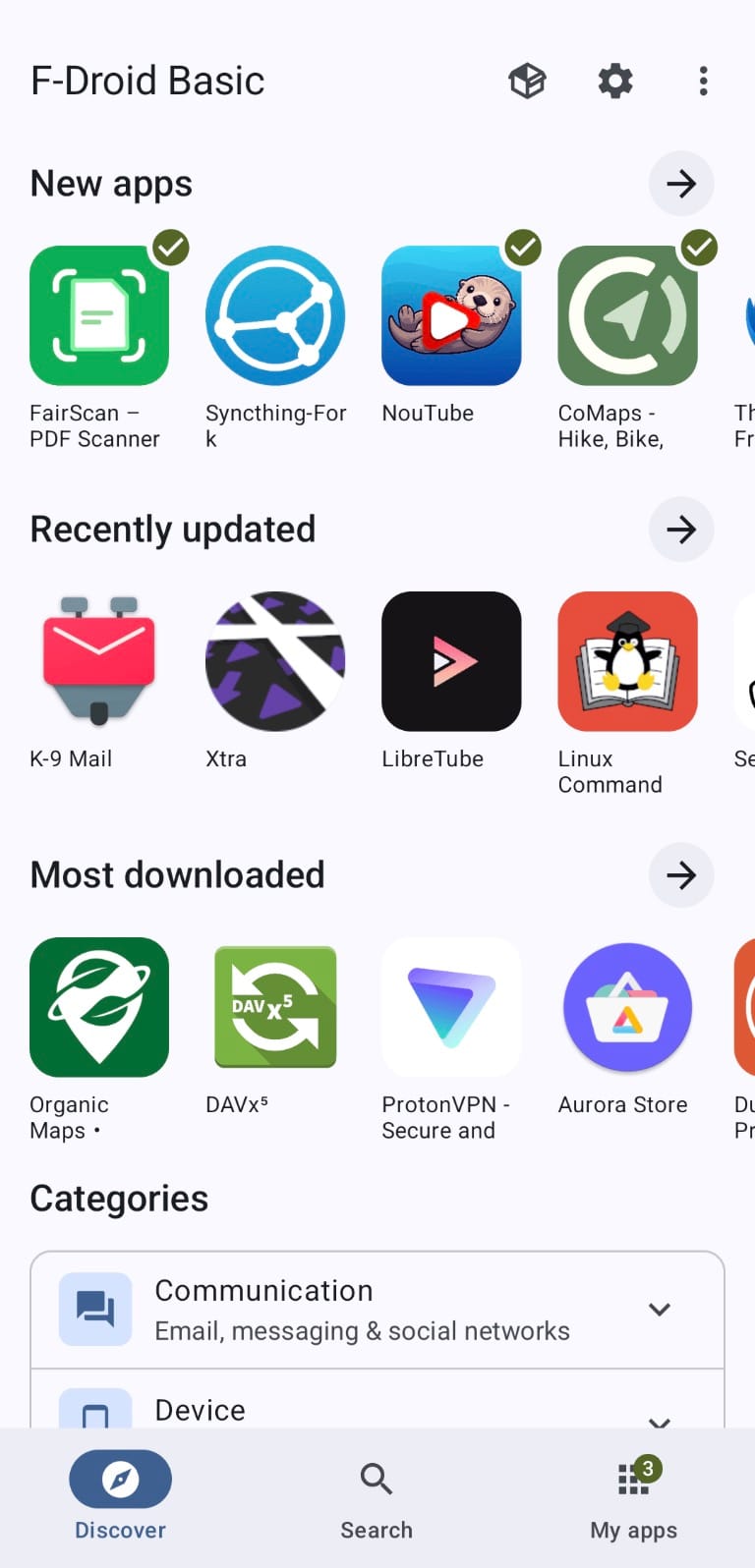
“The user experience was redesigned to integrate smoothly with current Android patterns, like Material Design, while keeping familiar F-Droid interactions in place,” the project says. The main navigation has been cut down to three: Discover, Search, My Apps, with Settings and Nearby Swap moved to the top bar, “still only a tap away from the top bar, but no longer compete for space in the main navigation.” Categories are now a part of the Discover section.
F-Droid is funded by donations and grants, and the work on this version was supported by the Open Technology Fund’s User Experience & Discovery Lab, which brought in Ura Design to “conduct user testing, develop user stories, and refine our Human Interface Guidelines.” The result is a set of onboarding screens that take the user through the app, rather than hiding features “behind complex settings,” and F-Droid does this without tracking you, or trying to “engage” you to spend increasingly more time in the app.
Key components of the app were “reworked and rewritten using Kotlin Compose, the standard toolkit these days,” and the entire thing was not just a surface level rewrite, as is evident from the changelog that mentions fixing “overlay issues in landscape mode on small screens” and “RTL presentation of updates,” meaning the app now works better on small screens, and in right-to-left languages, and has separate TV banners for full and basic versions.
F-Droid comes in two build flavors, basic and full, with the difference being that Nearby and the panic features are only available in the full version.
Discover finally makes F-Droid browsable
Finding the right app is now easier, thanks to the way F-Droid has expanded and rearranged its categories. The app’s own “ecosystem” has been growing to “thousands of applications,” and that growth has made app discovery “increasingly challenging,” F-Droid admits.
It used to be that users would have to sift through broad categories that were not very helpful – but now there are “many more specialized categories,” “helping you get closer to the kind of app you want in just a few taps, even before you start searching.” The headline example given is the Games category, that has been “completely reworked” and now has “17 different game genres.” But that count of 17 is arrived at by adding three other categories to the 14 that end in the word Game. Those are Dice, Emulator, and Visual Novel. The full list runs to 116 categories, and they cover a wide range of uses, from VPN & Proxy, Firewall, and Password & 2FA, to Emergency Action.
F-Droid is now grouping categories into higher-level “meta” categories, and these are shown on the Discover screen, that also displays newly added, recently updated, and most downloaded apps. Categories are now described, and these descriptions feed the app’s discovery feature; for example, the description for Action Game is “Action, sport, racing and platformer games.” The category system is so important that it was still being tweaked and expanded in the months before release. In fact, the categories are now so detailed that they reveal what type of apps are considered useful and popular among privacy and security-minded users who opt for F-Droid over the mainstream stores.
All the work on the categories was done to make it easy for users to find the right app, and once they do, the ranking of search results is designed to show them the newest, recently updated, or most downloaded ones.
The good news is that F-Droid achieves this without resorting to any behavioral tracking or engagement optimization techniques that Big Tech uses to keep users locked into their “ecosystems” for as long as possible. F-Droid users are not pawns in the same game of attention and personal data harvesting, and are not treated as such.
Search has become genuinely useful
F-Droid’s search used to be a tool that matched what you typed with app names in its repository. Now, with the 2.0 version, the search looks at app descriptions, categories, and translated content as well. This is a big deal, because F-Droid’s app names are often not descriptive, to the point where they are useless for anyone not already in the know. Who would think to search for “Organic Maps” when looking for an alternative to Google Maps, or “KeePassDX” when in need of a password manager?
But now, thanks to the new search, you can find these apps by searching for what they actually do.
As F-Droid itself explains, the new search makes it “easier to find apps based on what they do rather than what they’re called.” This is especially important for new users, who are not familiar with the names F-Droid has given the apps it includes.
Search now also covers translated content, and F-Droid says that users can now find apps “more reliably in their own language.”
In particular, F-Droid mentions that “the new search system provides much better support for CJK writing systems, helping users find relevant apps more reliably in their own language.”
A look at the changelog for F-Droid shows that support for Chinese, Japanese, and Korean languages was improved in several steps, starting from March 30 with “improve Chinese search queries” and “Fix CJK language search in app lists and my apps,” and continuing with “Fix name and summary localization in app details.”
And if a user types the same query multiple times, there is no need to type it again, as recent searches are now remembered.
Other improvements to search included moving it to the bottom navigation bar, remembering recent searches, searching in category descriptions, showing all categories in the empty state of the search screen, and several bug fixes and minor UI improvements.
One entry in the changelog is particularly telling: on March 30, F-Droid added the ability to “auto repair corrupted search index.” This is the kind of fix that doesn’t come from developers imagining what could go wrong, but from users actually encountering a problem and reporting it.
Filters are F-Droid 2.0’s power-user secret
F-Droid is an app store that, unlike the behemoths like Google Play, gives users fine-grained control over what they are, and aren’t shown in the store’s catalog.
That control is now better than ever with the release of the new F-Droid client version 2.0, which brings the ability to combine multiple filter criteria.
But F-Droid is also a store that “warns” its users about the presence of what it calls anti-features – and these are not minor things. An app can be flagged for containing ads, tracking and reporting a user’s activity, or promoting non-free network services, or depending on them.
The same goes for non-free dependencies, add-ons, and assets, as well as known vulnerabilities, weak security signatures, or the fact that the source code is no longer available, which means no more updates. Then there’s the “tethered” category, an app that depends on a certain instance of a network service.
With F-Droid 2.0, users can now combine filters in a way that was not possible before: by category, device compatibility, and anti-features, all at the same time. That means somebody using an old phone can now search for apps that are compatible with their device and that do not have the “Tracking” anti-feature, which means the app “tracks and reports your activity,” and that is something no commercial app store, such as Google Play, allows.
For users who do not want to be tracked, the new version of F-Droid provides a powerful tool. As the project itself puts it, “you can choose to view only Action Games that are compatible with your device and exclude apps that depend on non-free network services.”
Installing apps no longer feels second-class
Clicking install or update on F-Droid used to bring to life what the free and open source app store calls a “second rate” experience, forced onto users by Google’s Android. This happened because after the download was finished, users were first presented with a system prompt, and then had to give permission to install apps from unknown sources.
F-Droid says that thanks to the EU’s Digital Markets Act (DMA) and similar anti-trust actions around the world, Android has been pressured into offering all app stores an option to make this process smoother and more automatic. And F-Droid now uses this new system: “This allows F-Droid to use a unified installer for all F-Droid installs, whether built into the OS or you installed it on your device yourself.”
F-Droid users with phones that run Android 14 or newer get to experience the new, streamlined install process, while those with older handsets are out of luck. F-Droid says it “brings the F-Droid install experience on official Android devices much closer to what the built-in app store can provide,” and this is thanks to a feature called pre-approval that lets users approve permissions when choosing an app, rather than after the download finishes.
Somebody in Shanghai with an ordinary phone would not get the new flow. The reason is not the government, but a large number of Chinese ROMs that have not implemented pre-approval properly. “Many Chinese ROMs have as of 2026 not properly implemented pre-approval. They either return `3: INSTALL_FAILED_ABORTED: User rejected permissions` or not return anything at all,” a code comment explains. The country or a locale country of “cn” is used to determine that pre-approval should be switched off entirely.
The work on fixing this, which was opened in April 2026, and closed in June, did not bring a fix for the problem, but a workaround. F-Droid 2.0.0 changelog reveals that the solution was to “Cancel install pre-approval if the request fails, falling back to system prompt.”
My Apps: updates become something you don’t have to think about
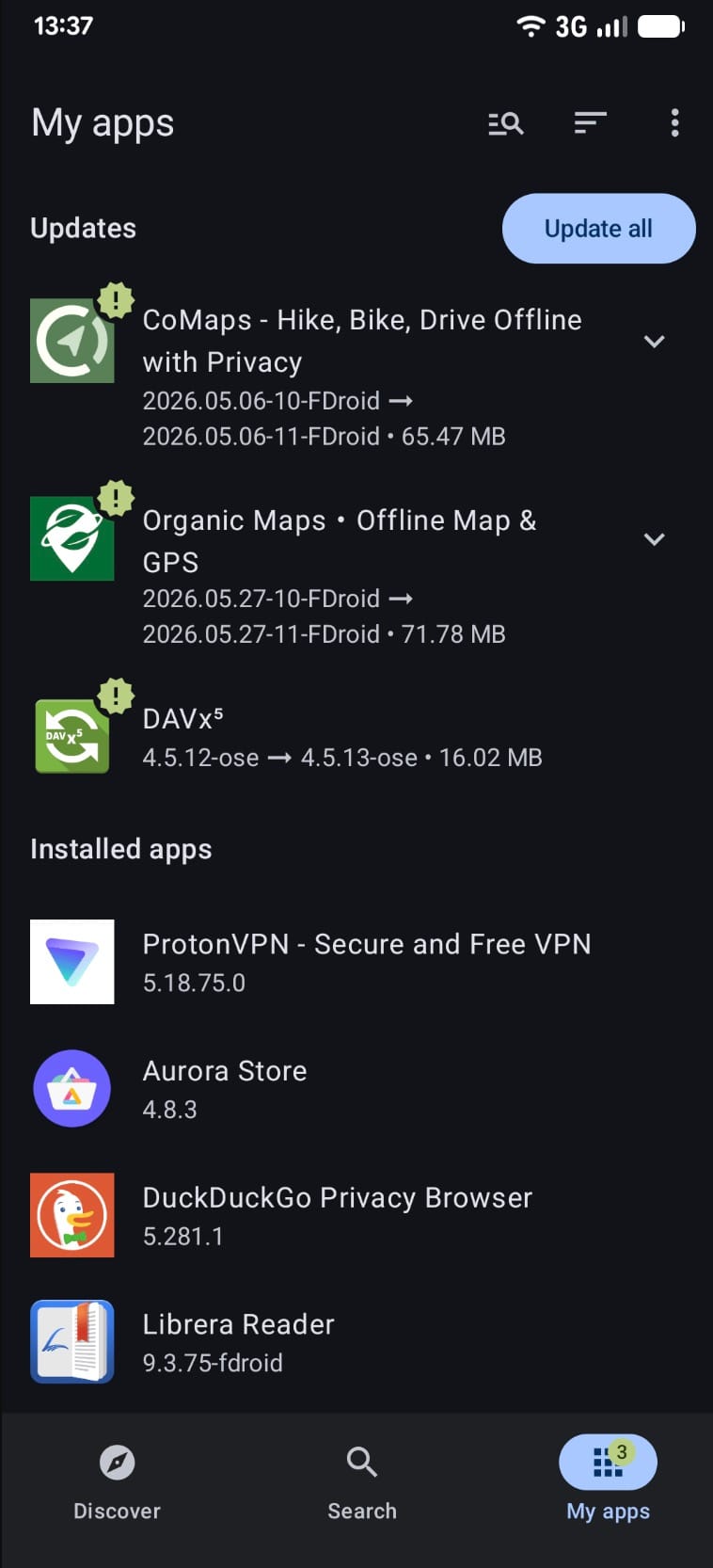
F-Droid 2.0 will fetch and install app updates by default, and the refresh gesture is gone. “Rather than preserving a familiar action, we focused on removing the need for it,” says the project’s site. “The best refresh button is the one you never have to press.”
F-Droid is also the store that will still run on a phone with Android 7, and will still offer apps that target that version. But if that’s the version of Android your phone is running, none of the apps will update themselves, because, as the F-Droid code puts it, that’s “not supported below Android 12.” And if you were able to update your operating system to, say, Android 13, but the maintainer of the app you’re using never got around to changing its targetSdk from 29 to 30, that app won’t update either.
The store that has the best chance of still carrying that app that’s no longer updated, but still works just fine on your phone, is F-Droid. But in order for F-Droid’s 2.0 to be able to silently update that app, the app would have had to be kept current in the first place. The F-Droid client will continue to support old Android versions, and old apps, but won’t enable silent updates for them. As the project’s code remarks, the arithmetic involved in all this “needs to be adjusted as new Android versions are released.”
The changelog mentions “enable auto-compression for downloads,” “allow user to never show metered network warning dialog,” and “prevent self-updates from getting stuck, allow updates to be canceled when waiting.” F-Droid explains that the reason for these changes is that its users are a diverse group with different needs when it comes to data usage. “Many users have cheap access to mobile data, while mobile data is prohibitively expensive for others. Some users have heightened privacy requirements, so they need to control their network traffic. While others are using limited devices which bog down when F-Droid updates in the background,” the free and open source app store said.
Privacy features have changed, and one important feature is missing
F-Droid puts it like this: “Some F-Droid users operate in environments where simply having certain apps installed or even using F-Droid can attract unwanted attention.” Those users have been using F-Droid’s features such as the ability to use the app with Tor, as well as “panic” and “disguise” features.
F-Droid has long supported Tor for all network connections and Tor Onion Services for repositories and mirrors. But in version 2.0, auto-detection of Tor is gone, and users are advised to use “Tor VPN” as the recommended approach.
“Going forward, Tor VPN is the recommended approach for easy Tor support, and the Proxy Settings are still available for those who need manual control,” F-Droid said, explaining that the reason for the change was that the landscape around Tor support has changed, and now, besides Orbot, there is TorVPN, TorServices, and more.
The panic features let a user wipe certain sensitive things fast in an emergency, triggered by an app like Ripple. They are still in 2.0 and F-Droid calls them “an important part of supporting users with elevated security needs.”
But the panic functionality is not the same as before. F-Droid says that while the feature is still available, the app-wiping part of it has not yet been ported to 2.0. In fact, F-Droid advises those who rely on this feature to “postpone updating to F-Droid 2.0 while we evaluate bringing the feature back.”
F-Droid’s app-hiding feature, now, is a single activity-alias in the app’s manifest, called “.IconCalculatorActivity,” that is disabled by default, and carries a calculator icon, but no actual functionality. This is a far cry from the first iteration of the feature that turned the entire F-Droid into a working calculator, with the open source app store functionality hidden beneath it. The calculator functionality was removed in F-Droid 2.0, as the changelog reveals: “Remove calculator functionality, the app hiding is now just an icon and name change.”
F-Droid explains that the new, basic form of app-hiding is not about providing strong protection, but about making users aware of the limits of the feature. “This feature is designed so that users can better understand the limits of the disguise,” the project said. The fake calculator icon and name are meant to be a quick way to hide the app from casual snoopers – but F-Droid wants users to be aware that the app will still be visible in the “Apps” settings, and can be detected during a forensic inspection. “This informs users that the F-Droid app will still appear in the ‘Apps’ settings and would be detectable during forensic inspection,” F-Droid said. The project added that it adopted the simple icon and name change scheme because it had by then become a standard among other apps, such as Orbot, TorVPN, and Signal.
And while the company is asking for feedback from those who use the panic mode to know “how and when it is used,” the release of 2.0 came with one related issue still open.
It concerns the part of the panic mode that is still available, which is to hide the app. But the ticket, opened on September 13, and last updated on September 23, the day before the 2.0 announcement, shows that the work was not finished, and the hide option still “does not explain what will happen and how to reverse.”
What else disappeared or changed?
F-Droid Privileged Extension (FPE) is not supported in 2.0. F-Droid explains that the component, which lets the app install and update other apps without prompting the user, is not needed any more as the new version, 2.0, brings full support for Android’s “session” installer.
This means that F-Droid 2.0 can update apps in the background on any recent Android version, without the need for FPE. FPE was a way for F-Droid to do this on ROMs that included it, but that was the only way it worked.
Android 6 is out. The new version of the app requires at least Android 7 to run, and F-Droid explains why: “Some new tools also depend on fixes in Android itself, one such fix was added in Android 7 forcing us to drop support for Android 6.” The build file backs that up, setting the minimum to Android 7.0.
Another change affects custom ROMs that ship F-Droid. They can include their own repositories, and until now, they were doing this by using an XML file. That method is now obsolete, and those who build these ROMs are advised to switch to using a JSON file, but also to ship both files for the time being, until version 2.0 of F-Droid stabilizes.
F-Droid is blunt about it: “The old method of adding repositories using an XML file will not work in F-Droid 2.0. We suggest to ship both, the JSON and the XML file as soon as possible until F-Droid 2.0 has stabilized.” The new method involves placing the additional_repos.json file in one of the following locations: /system_ext/etc/fdroid/, /product/etc/fdroid/ or /vendor/etc/fdroid/. The file can also be placed in a subdirectory with the name of the package, if a ROM wants to make the repository available to a single app.
Nearby isn’t finished yet
Nearby, also called Nearby Swap, is the feature that lets two devices running the F-Droid client connect directly, i.e., without the need for a server, in order to transfer apps from one device to another. This is a unique feature that can be particularly useful in scenarios where the network is filtered, censored, expensive, or otherwise not reliable, or simply watched.
It’s not a new feature, but it is one that the F-Droid community has been waiting to see revamped and improved as part of the client’s new major release, F-Droid 2.0.
However, 2.0 includes only the old Nearby, carried over from the previous iteration, and not the rebuilt one that the community has been waiting for. In fact, F-Droid has now announced that the work on the new Nearby is ongoing, and has been for a long time – the work item on the project’s issue tracker is from May 2025, and was last updated in April this year. The announcement suggests that the community can now “help shape the next generation of the feature before it reaches a wider audience.”
What users got instead in 2.0 is the old feature, “ported” to the new codebase, as the project’s changelog from April 7 shows. The July 10 entry reveals that the work on implementing the old Nearby in 2.0 was completed, and that it was based on the “stable implementation.” The same entry also shows that the new F-Droid client has two limitations regarding Nearby: it does not work on Android 7.x and the connection can only happen on the same network subnet.
And there’s another thing: the feature only ships with the full version of the app. Anyone running the basic build is out of luck for the time being. The changelog entry from August 20 explains that Nearby was a source of crashes in 2.0, so a fix went in to “Prevent nearby crashes from affecting users not using nearby.”
The announcement of the new Nearby, meanwhile, invites the community to get involved by testing the new implementation and providing feedback, while the code is on GitLab.
The overhaul you can’t see
F-Droid says the interface is now built with Jetpack Compose and that the app is written in Kotlin, “the language that has become the standard for modern Android development.” This might seem like a technicality of little interest to end users. The reason it is not is that the smaller the pool of developers who can read a codebase, the longer everything takes, and F-Droid says the point of the rewrite was “to lower the barrier for new contributors.”
The goal of the rewrite was to make it easier for new contributors to join, and to make the whole project more sustainable, the free and open source (FOSS) app’s developers said. According to them, the choice of Kotlin was logical since it has become the standard for Android development.
F-Droid also says that the changes made provide a foundation for the project’s further development over the next decade, while at this point, they bring a number of improvements to the user interface and performance, including faster queries of the database.
Other changes include “many unit tests,” “screenshot tests for most the UI states,” and changes that make it easier to identify and fix problems, such as disabling proguard optimization and adding more information to crash reports.
The new version also brings a change to the way logs are collected, using a unique identifier (UID) for logcat “if available to get logs from previous processes.”
The project received funding from several sources, including the Open Technology Fund’s User Experience and Discovery Lab, which supported research and design work, and the Open Technology Fund’s FOSS Sustainability Fund, NGI, and the Calyx Institute. Torsten Grote’s work on the code was funded by NLnet through the Mobifree fund, while Ura Design was in charge of the user interface and user experience research and design.
F-Droid also underwent a security audit conducted by the Open Technology Fund’s Security Lab and Convocation, the results of which have not been made public. F-Droid says it “analysed and addressed all findings relevant to the new application.” The full report, however, has not been cleared for publication yet, and this publication has not seen it.
What the changes add up to
“For the longest time, the experience of clicking install or update was forced to be second rate by Android,” said F-Droid, and that has now changed. The project has announced version 2.0 of its app, and claims that the improvements are a result of “pressure from the EU’s Digital Markets Act (DMA) and anti-trust actions around the world.”
What the new version brings to the user interface is the same on every device, and that includes browsing, expanded categories, search that looks into descriptions and translations, as well as filters that can be combined.
It’s a different story with two other features that improve the experience of using F-Droid: full control over updates, and “pre-approval” – that is, the confirmation moving to the moment the user picks the app, rather than arriving once the download has finished. Those work only on Android 12 or newer, and only if the app targets recent API levels.
Not only that, but these features also require Android 14 or newer to work in full, i.e., without having to watch over the installation. F-Droid’s users, however, skew towards running the app on older hardware, as well as on de-Googled ROMs, and on devices running small apps maintained by a single person.
All these groups will continue to experience “friction” when using the alternative app store. And one feature that has been removed from the new version is the possibility to “wipe” an app in a panic, by quickly uninstalling it. Those who used this option are advised to “postpone updating to F-Droid 2.0” – while those who are upgrading will have to make do with an option to “disguise” an app by changing its icon and name.
F-Droid’s next decade
F-Droid 2.0 has arrived, bringing with it both a UI overhaul and a new technical foundation. The release has been in the making for over a year, and the new iteration has been preceded by 14 test releases.
F-Droid says that the changes made in this version are not only skin-deep, but also provide “a foundation for the next decade of F-Droid development.”
But what has changed, and what is the cost of upgrading to this new version?
F-Droid 2.0 drops support for Android 6, and doesn’t use the F-Droid Privileged Extension (FPE). Users who relied on the panic trigger to wipe apps in an emergency will have to do without it for now, as that part has not made it into this release. The rebuilt Nearby service is also not in this version, and custom ROM builders will have to switch from XML to additional_repos.json.
The fate of app wiping and the new Nearby remains to be seen, as does the publication of the audit report.
F-Droid invites users to “welcome feedback” on both the decision to drop FPE and on whether to bring back app wiping.
This release was preceded by a long development period, and came with an open ticket regarding the app’s hide feature, and a work item for the Nearby service that was last updated in April.
F-Droid says that the changes in 2.0 provide a foundation for the next decade of development. That decade will apparently start with a new UI, but without the promised audit, and with the Nearby service and app-wiping features still in limbo.